Spruce forest in front of a snow-capped mountain range

Structureddelivery for teams.

Where your people and your AI agents get real work done together. Agents take roles and pick up work. Your team decides what goes out.

Pathfinder

Works with the tools your team already uses

  • Claude
  • Claude Code
  • Codex
  • GitHub
  • Slack
  • Workato
  • Microsoft Teams
  • SharePoint
  • Figma
  • Linear
  • Jira
  • Confluence
  • Notion
  • Google Drive
  • Gmail
  • HubSpot
  • Zendesk
  • Gemini
  • Supabase
  • Vercel
The problem

Agents are only as good as what they know.

Each new chat starts from zero. Agents don't know your client, your standards or last month's decision, so your team ends up re-explaining the job every time.

  1. Does it know what we decided?
  2. Does it know the client hates that?
  3. Is it using the old brief?
  4. Who's keeping it up to date?

Pathfinder gives every agent your handbook, sources and decisions before it starts, and keeps them current.

How it works

Built for how your team already works.

Marketing runs campaigns. IT runs requests. Product runs releases. Each gets its own board, its own agents and its own sign-off, on one shared base.

Ask Chief · new work
Plain words are fineSend
Context

Agents that know your organisation, and keep knowing it.

Most agents start every task with amnesia. Pathfinder keeps your organisation's context in one place, keeps it current, and gives it to every agent on every run. Pick a source to see what it adds to an agent's brief.

Services · Product designhideandseek.digital
Flexible Work ArrangementsSharePoint · HR policies
Brand Guidelines v3.pdfUpload · 42 pages
Ways of WorkingSharePoint · Site pages
Client Onboarding ChecklistUpload · 2 pages

Your handbook

drafted from your sources · checked by people
Who we areWaiting
How we soundWaiting
How we workWaiting
RulesWaiting
Who we serveWaiting
## Copywriter agent · TASK-231
Briefed with your handbook
Plain, warm, Australian English
Never paste client data into outside tools
Nothing goes public without a person
5 of 5 sections confirmed
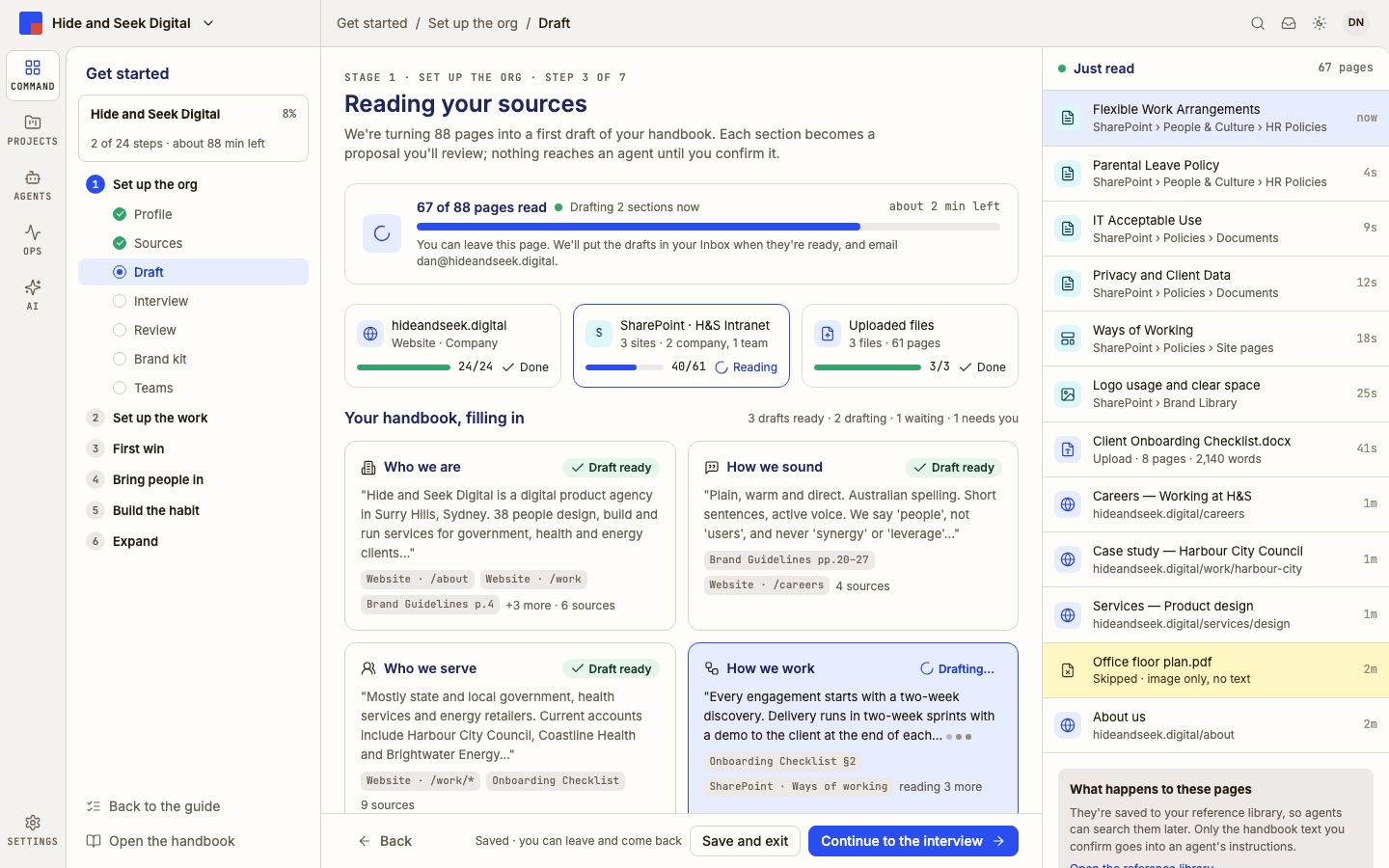
Pathfinder reading your sources and drafting the handbook
Just read · SharePointFlexible Work Arrangements
Drafting · How we sound"Plain, warm and direct. Australian spelling. Short sentences."
Nothing reaches an agentuntil a person confirms the section.
From Copywriter agent · draft for your reviewTo Sam, Coastline Health · Re: flu-season campaign
Assistant· knows the Hide and Seek Digital handbook
Agent brief · previewDesigner agent · TASK-207

This is the preview your team sees: exactly what agents are told, so there are no surprises.

How it stays current
  1. Drafted, then reviewed. Pathfinder drafts handbook sections from your sources. People approve each one, so agents only learn what someone has checked.
  2. Re-synced from the source. Connected sources re-sync, so the library follows your real documents, not a copy from launch day.
  3. Gaps come back to you. Questions the handbook can't answer collect in handbook health, so you fill the gap once.
How agents get it
  1. Built into every run. The handbook, brand and relevant history go into each agent's brief automatically. Nobody pastes anything.
  2. Looked up when needed. Agents search the library and the knowledge graph through Pathfinder's MCP server, in the app or in Claude Code.
  3. See what they see. The brief preview shows exactly what agents are told about your organisation.
Agents on the team

Agents with jobs, managers and limits.

Staff a project from a library of ready-made roles. Each agent knows its job, its tools and its rules, and when it gets stuck it escalates to someone who can fix it.

PersonAgentClick anyone to see what they can do alone
Product owner
Tech lead
Design
Developer
QA
Reviewer Approver
Alongside every team, not in the line:CHChiefASAssistantLBLibrarian

A task, start to finish

Alongside the team
CHChiefWatching
ASAssistantHelps you
LBLibrarianKeeps the handbook
YOUYouPerson
POProduct ownerWorking
TLTech leadWorking
SUSupportIdle
DSDesignerWorking
DVDeveloperWorking

How much the Developer agent does alone

Set per agent. At every level, plans get reviewed by a person and the budget is a hard stop: hit it and the agent pauses.
When an agent gets stuck

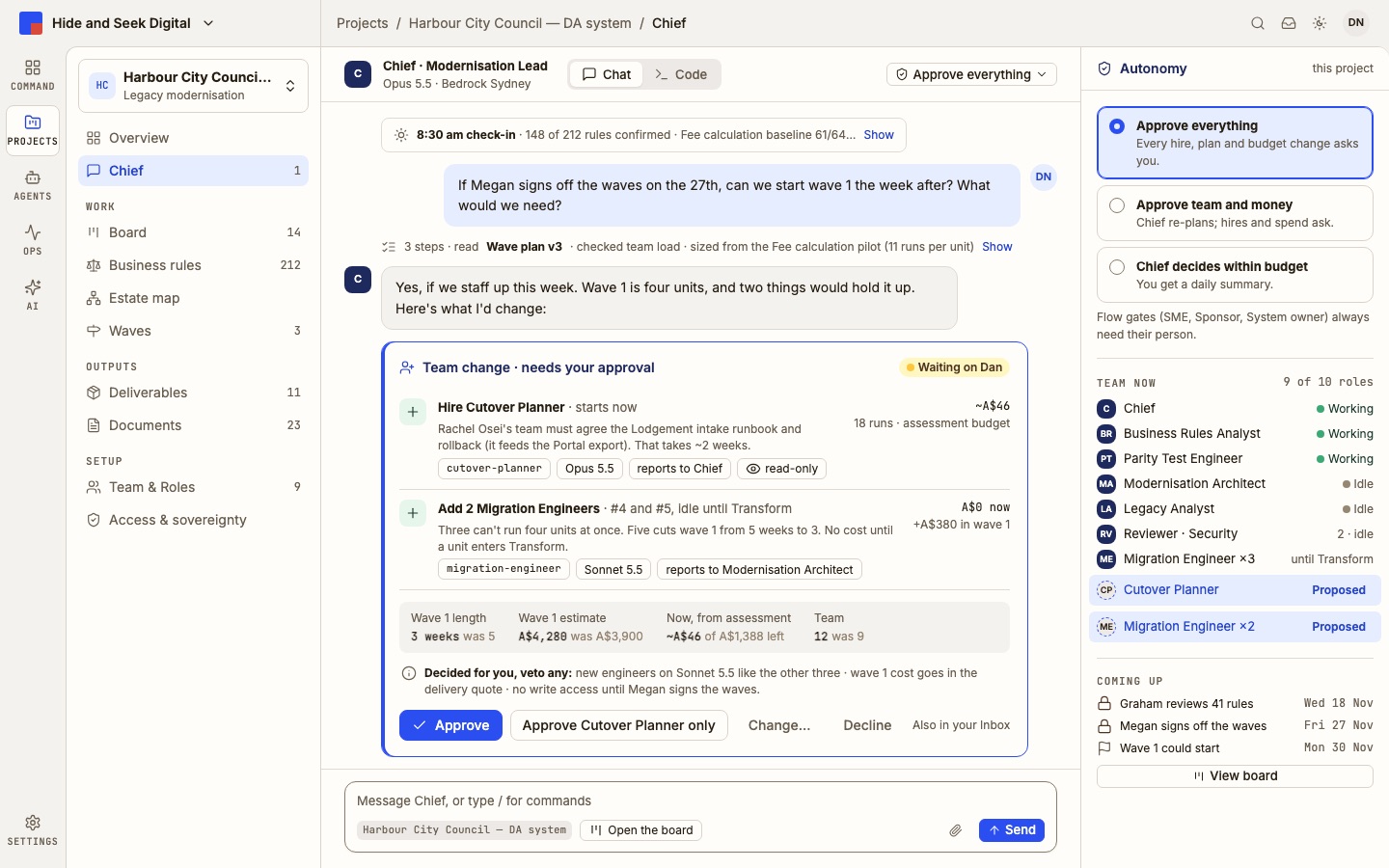
The project Chief proposing a team change for approval
Chief · Modernisation lead"Wave 1 is four units, and two things would hold it up. Here's what I'd change."
Team change · hireCutover Planner, reports to Chief · about A$46
Waiting on DanApprove, change or decline. Also in your Inbox.
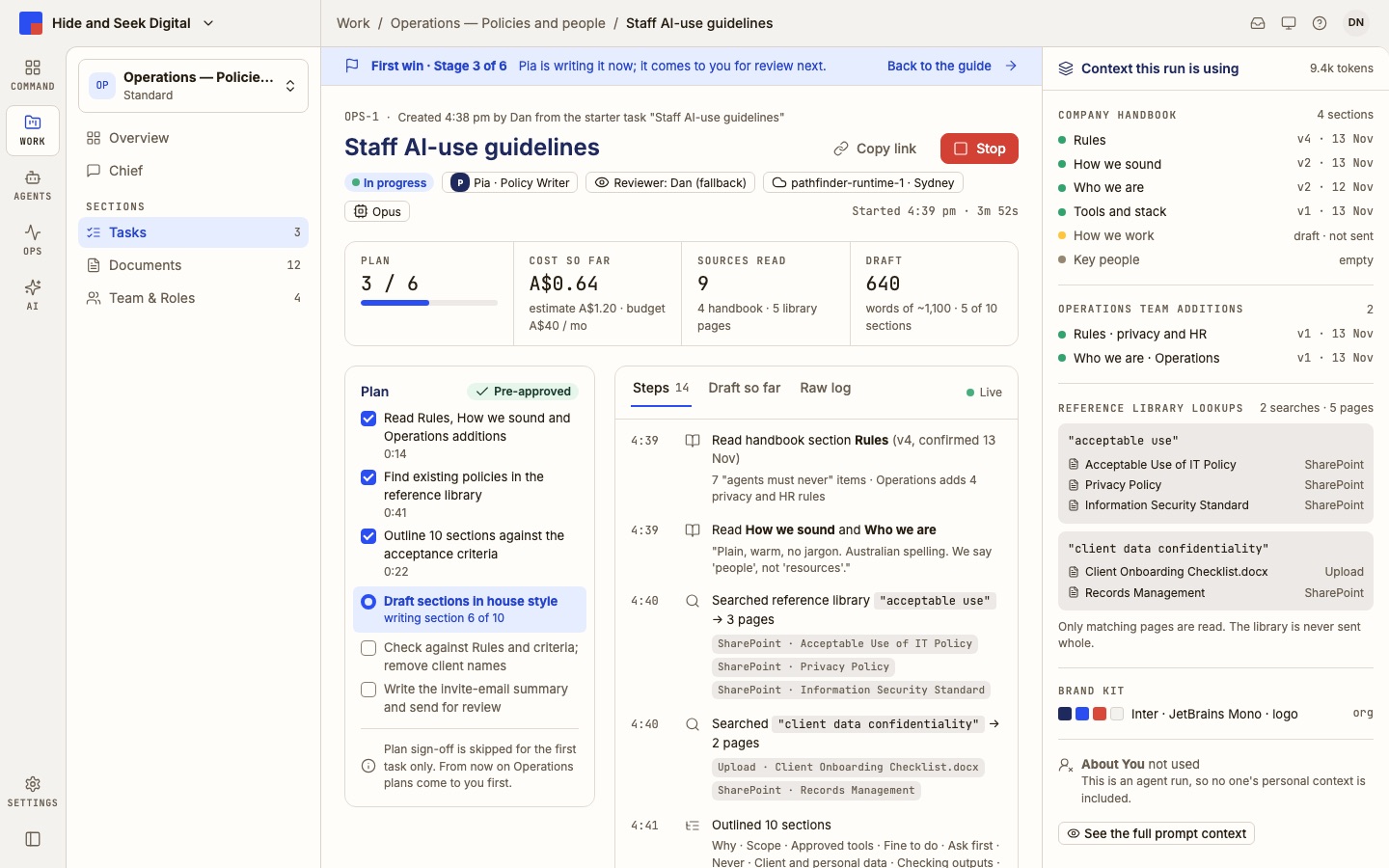
An agent run showing its plan, steps, cost and the context it is using
Plan · pre-approvedRead the Rules, find existing policies, draft in house style
Context this run is usingRules v4 · How we sound v2 · 3 SharePoint pages
Cost so farA$0.64 of an A$1.20 estimate · reviewer: Dan

OrgAssistant
ProjectChief
Developer
Designer
Product owner
Tech lead
Support
PersonYou
Autonomy level
ObserveProposeAuto low riskAutonomous

Daily budget · Designer
Inbox · what needs you
    Agents start work whenA task moves on the boardA schedule firesYou ask them to
    Code

    Run several coding agents at once, and review what they did.

    Trailblazer, inside the Mac app, runs coding agents in parallel, each in its own copy of the repo. Watch them in a structured chat or a live terminal, review the diff, and open the pull request without leaving the app.

    TASK-212Add rate limiting to the export APIDeveloper agent · branch fix/export-rate-limit+142−18
    api/export/route.tslib/rate-limit.tslib/rate-limit.test.tsdocs/decisions/D-44.md
    Tests pass · reviewed against decision D-44 and risk R-9
    3 agents running3 copies of the repo1 review queueruns on your Claude subscription
    Trailblazer · terralayer
    Your subscription, your machine.

    Pathfinder drives Claude Code the way you already use it, on your Mac or on a cloud runner when your laptop is closed. No separate AI bill to start.

    Connected to the project.

    Coding agents read the project's decisions and tasks, and propose new tasks or updates for you to approve, through Pathfinder's MCP server.

    Control

    Agents propose. People decide.

    Data sovereignty

    You know where your data is stored, and you choose where agents run: your own machines, your own servers or boxes we set up in the region you pick.

    Your choice of AI

    Model calls go to the provider you pick. Need them to stay in your region too? Connect AWS Bedrock there.

    Access per role

    Each app is set to allow, ask first or read only for each kind of agent. Support agents can read a ticket without being able to post anywhere.
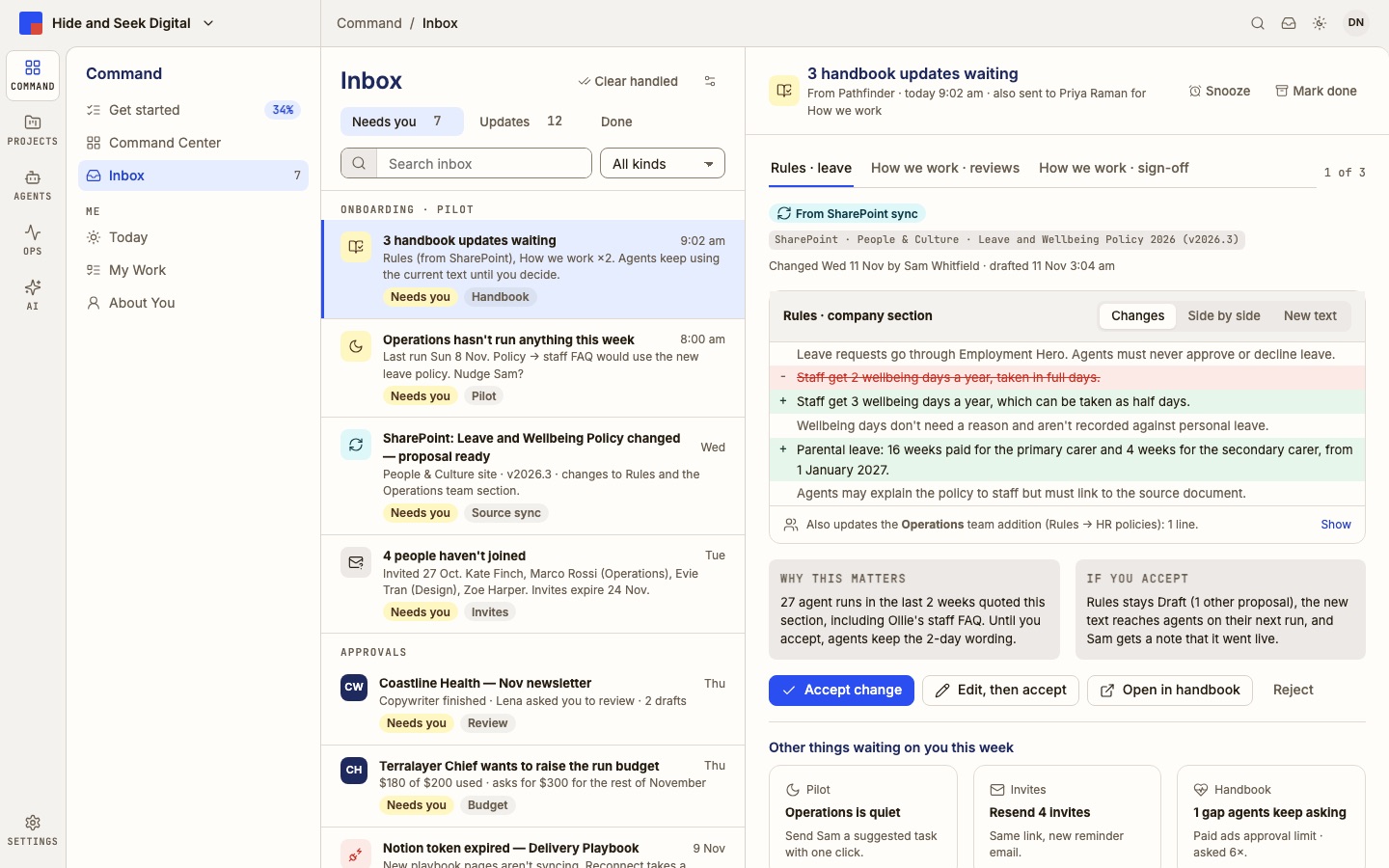
    The Inbox showing a handbook change waiting for approval
    Needs you · 7Handbook updates, budget asks, newsletters to review
    Why this matters27 agent runs in the last two weeks quoted this section.
    If you acceptEvery agent gets the new rule on its next run.
    CHTerralayer Chief · asks for budget

    Raise this month's run budget from $200 to $300

    $180 of $200 used · 11 days left
    WhyTwo extra waves were approved last week. At today's rate the budget runs out on the 24th.
    If you declineAgents pause on the 24th and the Chief re-plans wave 3.
    Waiting for you
    record · terralayercost
    01

    Agents propose.

    Hires, spend, plan changes and handbook edits arrive as proposals with what happens if you say yes.

    02

    People decide.

    Everything that needs a person lands in one Inbox. Approve, edit or decline in a click.

    03

    It's all on the record.

    Every run shows what it read, what it did and what it cost. Gaps in the handbook come back to you.

    Governed by default

    Agents can propose tasks and changes; a person approves them. The approval queue shows exactly what will happen before it does.

    Proposed by Tech lead agentWaiting for approval

    Create task TASK-212 "Add rate limiting to the export API" and assign it to the Developer agent.

    + task  TASK-212  status: todo  assignee: Developer agent
    + link  risk R-9 → TASK-212
    A record of every action

    Every agent action is logged with its cost, so you can see what each agent did and what it spent.

    1. Developer agent opened PR #318$1.42
    2. Designer agent published frames for TASK-207$0.86
    3. Support agent triaged 6 tickets$0.31
    Data sovereignty

    You know where your data and the web app are hosted. Bring your own AI connection, including AWS Bedrock in a region you choose, for in-app AI.

    Works with your tools

    Designs flow from Figma into tasks; code flows back as pull requests.

    GitHubFigmaVercelWorkatoSharePointNotion
    While you're away

    AI on its own vs. AI with a system.

    Most teams already use AI. Here's what changes when it works inside Pathfinder.

    With PathfinderAI chat on its own
    What it knowsYour handbook, sources and decisionsWhatever you paste in
    Who does the workAgents with roles and a managerWhoever has the tab open
    Before it goes outA person approves itCopy, paste, hope
    What it costEvery run, every dollarOne bill, no idea
    Next monthOn the record and searchableLost in someone's chat history
    Where your data livesWhere you chooseUsually overseas
    Doing it by hand

    Slow, but checked.

    People write everything, review everything and remember everything. It works until the team is stretched.

    With Pathfinder

    Fast, and checked.

    Agents do the groundwork with your context and rules. People approve what goes out. Everything is on the record.

    AI chat on its own

    Fast, but unchecked.

    Everyone has their own prompts and their own idea of the brief. Nobody knows what was sent, or why.

    Who it's for

    Teams that deliver work for someone else.

    01 · Agencies

    Client work, without the status meeting.

    Agent teams per client, every client's work kept apart, progress the client can see.

    02 · Product and support

    Build and run, in one place.

    Agents do the groundwork on tickets and releases. People make the calls.

    03 · Government

    Sovereign, approved and on the record.

    Data sovereignty, approvals on agent actions, and pilots run department by department.
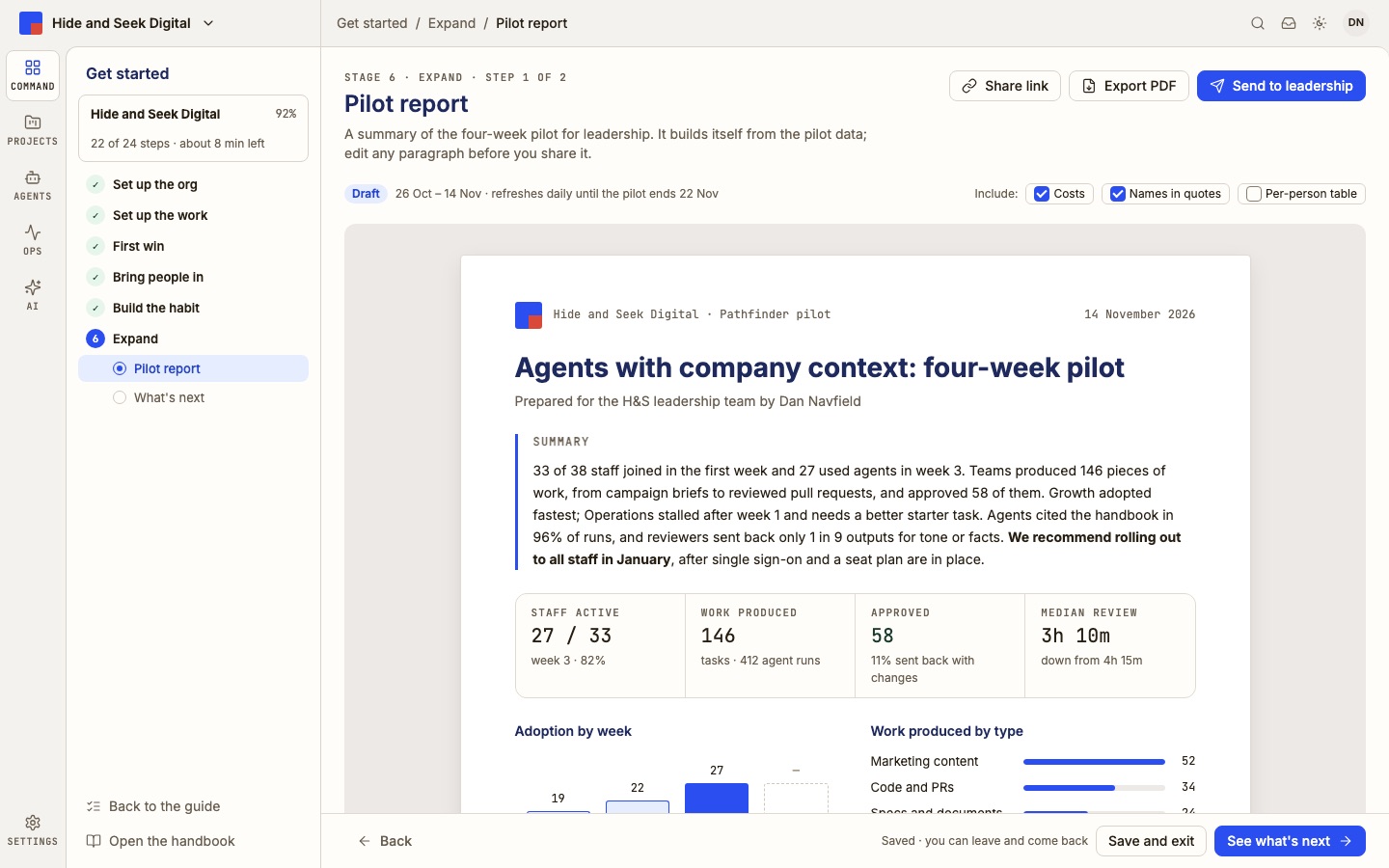
    A four-week pilot report ready to send to leadership
    Week 327 of 33 staff using agents
    Work produced146 pieces · 58 approved as-is
    Median review3h 10m, down from 4h 15m
    Built for youA pilot report you can send to leadership.
    Agencies

    Run client projects with agent teams, keep every client's work separate, and show progress without a status meeting.

    Product and support teams

    Build products and run support services in the same place, with agents doing the groundwork and people making the calls.

    Government departments

    Data sovereignty, approvals on agent actions and a full record of what agents did. We run pilots department by department.

    What we're shipping

    We publish what we're building.

    These are planned and in progress, not available yet.

    Shipped lately

    1. ShiftsAgents start a shift, keep notes as they go and hand over cleanly when they reach their limits.
    2. OutputsDrafts and documents open beside the chat, with share links and PDF download.
    3. Runs that report honestlyEvery run says what actually happened, on a Mac or on a box.
    4. Security & auditEvery event, key use, approval and refused app call, searchable and exportable.
    5. More than Claude CodeAgents can also run on Codex, Gemini CLI or OpenCode.
    6. Guests, and a wall between organisationsGuest access to named projects, and a test on every table that one organisation can't see another's data.

    Building now

    1. Watch and take overFollow any run live, take the keyboard and hand it back.
    2. Testing on devicesAgents check their work on the web and Android on a box, and on iPhone on a Mac.
    3. The Chief on your subscriptionRun the Chief on your own Claude sign-in, on your own machine.
    4. More kinds of workCasework, shared inboxes, routines and the rest of the eight: write, design, plan, analyse, build, run, meet and review.

    Next

    1. One credential serviceAgents use credentials without ever seeing them.
    2. A public Security & Trust centreIncluding the gaps we know about and our Essential Eight response.
    1. Now buildingRuns that report honestlyEvery run says if it's working, waiting on you, stalled or done. No quiet re-runs.
    2. NextStronger tenancyDifferent roles, guest access to named projects, an audit log.
    3. NextOne credential serviceAgents use credentials without ever seeing them.
    4. SoonSecurity & Trust centrePublic, including known gaps and our Essential Eight response.
    5. SoonA Chief that noticesWakes on its own when work waits for review or an agent goes quiet.
    The pilot

    Try it for four weeks. Then decide.

    Start with a pilot.

    We set up your organisation, your handbook and your first agent team with you, then expand team by team.